
How to add your booking link to Google, Yelp, Instagram and Facebook
By Scott Tilney, founder of InPops · Updated
Most guests decide to book the moment they find you: on Google Maps, in your Instagram, on Yelp. If your booking link only lives on your website, those guests call, or they keep scrolling.
This guide shows where a booking link can go on each platform, with the exact taps, and which "Book now" buttons are locked to partner apps so you stop hunting for a field that is not there. It works with any booking link, from any booking software.
What is a booking link?
It is the web address of the page your guests book on. Open that page the way a guest would, then copy what is in the address bar: that is your link. It starts with https:// and guests never need an app to open it.
- Booksy
- In the Booksy Biz app: Profile, then Share.
- Fresha
- In Fresha for business: More, then Online booking, then Link builder. Create a link under Link to everything and tap the copy icon.
- Vagaro
- In Vagaro Pro: More, then Settings, then Business Profile. Your Vagaro URL is near the bottom.
- Square Appointments
- In the Square app: More, then Online Booking, then Square Online website, then Share.
- GlossGenius
- In the GlossGenius app: Settings, then Website, then Share Website.
No booking page at all? Get one in five minutes ↓
How to add a booking link to Google Business Profile
Your listing on Google Search and Maps gets a booking link that opens your page. Most guests find a salon on Google, so do this one first.
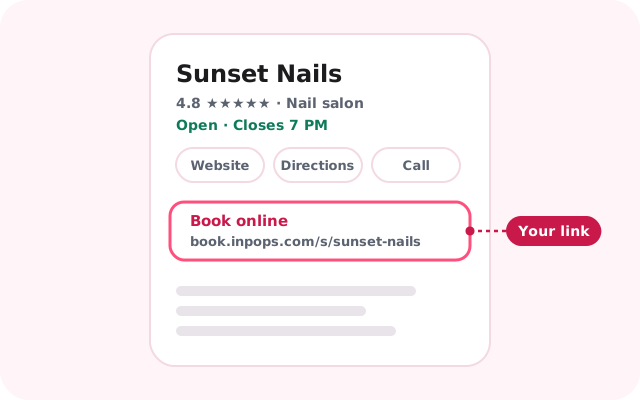
Google's blue Book online button only comes with its partner apps. The link you add here is the free one every business can have; Google sometimes calls it an appointment link.
First: Your profile has to be verified first, which means Google has checked that you run the salon: usually a short video of the shop and its sign recorded on your phone, sometimes a phone or email code, a video call or a postcard; Google picks which ways it offers you. Its category also has to be a salon, such as Nail salon. Google's verification steps →
- Sign in to the Google account that owns your salon's Business Profile.
- Search Google for your salon's name and town. Your profile appears with a row of buttons for managing it. (In the Google Maps app, tap Business at the bottom right, then Edit profile.)
- Tap Booking (or Bookings).
- Tap Add link, paste your booking link, then Save.
- If other links are listed there, tap Set preferred link and choose yours.
- Google usually shows it within minutes, sometimes a day or more. Search for your salon the way a guest would and tap the booking link to check it opens your page.
- Switching from Booksy, Fresha or Vagaro? If a blue Book online button still goes to the old app, open Booking, tap Remove provider beside it and finish on that company's site. They have five days to take it down; Google cannot remove it for you. Compare their prices →
- Use the page where guests actually book, not a contact page: Google checks the link and removes ones where nobody can book.
- No website? Paste the same link into the Website field too.
Reference: Google's page on business links
How to get a booking link for your nail salon
InPops gives a nail salon one in about five minutes: guests tap how many, when and a time, and get a text to confirm. No app for them to install, no commission on any booking, and the same link forever. $149 a month for the whole salon, every technician included.
- Guests book themselves at any hour, with only open times offered
- Fewer no-shows: a receipt, a reminder that asks for a YES, a link to move or cancel
- Groups book together, each with their own service and technician
- Unlimited technicians and texts in one flat price. Never a commission.
On Booksy, Fresha or Vagaro and paying per technician or per booking? Compare the prices →
Already on InPops? Your link is under Settings › Online booking, with Copy link beside it.
How to add a booking link to Instagram
A Book online link at the top of your profile, and a tappable link in any Story.
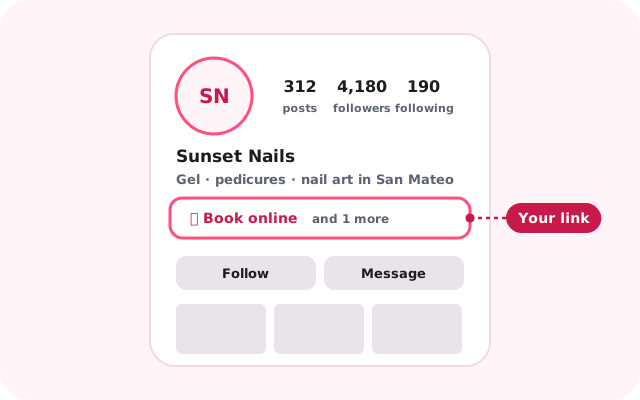
Instagram's Book now button only works with its partner apps, so skip it. The profile link is what every other salon uses, and it is what guests tap.
- Go to your profile and tap Edit profile.
- Tap Links, then Add external link.
- Paste your booking link, type Book online as the title, tap Done.
- Have other links? In Links, tap the three dots, then Reorder links, then hold Book online and drag it to the top. The top link is the one that shows on your profile.
- In a Story: add your photo, tap the stickers icon, choose Link, paste your booking link, tap Done.
Reference: Instagram's page on profile links
How to add a booking link to a Facebook Page
A Sign up button on your Page that opens your booking page, and the link under About.
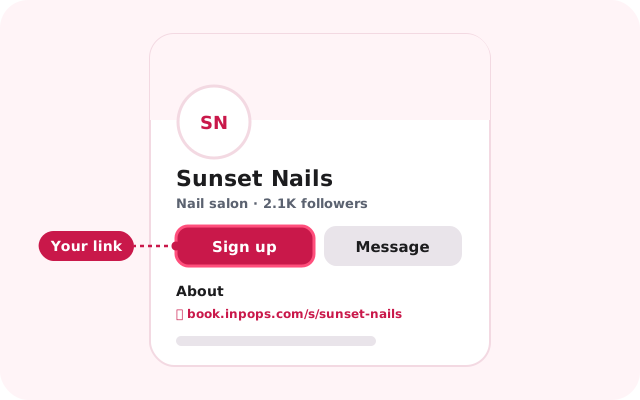
Facebook's Book now button only connects to Meta's own scheduler or its partner apps; it cannot point to an outside link. Sign up or Learn more can, and guests tap it just the same.
- On facebook.com, click your profile photo, then See all profiles, and switch to your salon's Page.
- On the Page, click Options (the three dots), then Add action button. If the Page already has a button, click Edit action button instead.
- Choose Sign up or Learn more, click Next, choose Website link, paste your booking link, and Save.
- Click About, then Add a website, and paste the same link so it shows there too.
- Tap the menu, then switch to your salon's Page.
- Tap Profile, then the three dots (More options), then Add action button (or Edit action button).
- Tap Edit buttons, choose Sign up or Learn more, paste your booking link as its website, and Save. If the app offers no website box for it, use a computer.
- For the About section: tap the Page's profile picture, Edit, then Edit next to Links, and paste the link.
Reference: Facebook's page on action buttons
How to add a booking link to Yelp
Your Yelp page's website link opens your booking page, and you can paste it into every reply.
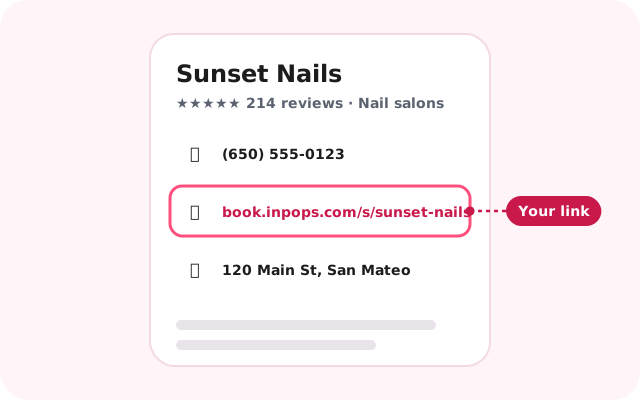
Yelp's Book Appointment button is a paid upgrade, and Yelp's own booking panel is only for its partner apps. The website field below is free.
First: Never claimed your Yelp page? Claim it first, free: search for your salon, pick it, and Yelp sends you a code by call, text or email. Then the steps below work. Claim your page on Yelp →
- Sign in at biz.yelp.com.
- Click Business Information in the left menu, then Edit beside your basic information.
- Paste your booking link into the website field and click Save Changes. It shows at once; Yelp may review it after.
- When somebody writes to you through Yelp, paste the link into your reply.
- Tap Biz Info at the bottom of the screen, then the website field.
- Paste your booking link and tap Save.
- Have a real website you want in that field instead? Keep it there, and put a Book now button on the site (see Your website below).
- The Book Appointment button is a paid Page Upgrade (from about a dollar a day, or in the $180-a-month Upgrade Package), and Yelp asks that it lead to your own website, so it may not approve a booking page on another domain.
- If an old Book an appointment panel from Booksy, Vagaro or Booker still shows, Yelp cannot switch it off from your dashboard: turn it off in that app (in Vagaro, Business Profile, then List Business on Yelp) or ask that company, then Yelp support if it stays.
Reference: Yelp's page on business information
How to add a booking link to Apple Maps
A Book button on your salon's card in Apple Maps, on every iPhone.
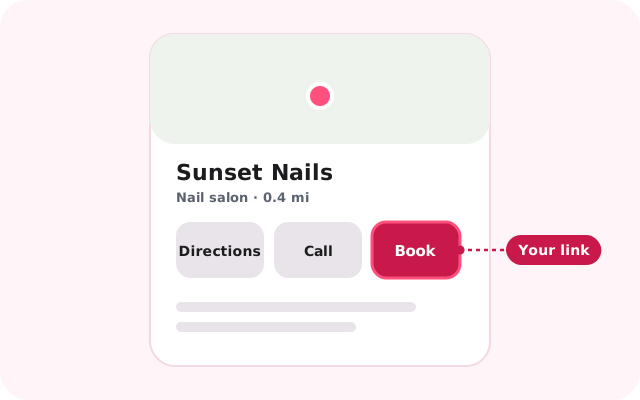
First: Apple Business Connect is now called Apple Business. If your salon is not there yet, registering is free, and Apple checks it is yours before the steps below work.
- Sign in at business.apple.com with the Apple account that owns your salon's listing.
- Click Brands, then Locations, then your salon.
- Beside Actions, click Add (or Add an Action Link).
- In the Action menu choose Book (or Schedule), paste your booking link, click Add, then Save.
- Apple reviews it within about three business days. Open your salon in Apple Maps on an iPhone to check.
- Keep your own website in the Website field; Apple wants that to be your site, not a booking page. The Book action is the place for the booking link.
Reference: Apple's page on Actions
How to add a Book now button to your website
A Book online button on your site that opens your booking page.
- Wix: click the button, click the link icon, choose Web address, paste your booking link, choose a new window, click Done. If Wix Bookings is installed, its own Book Online page can take over template buttons; relink the button, or delete Wix Bookings under Pages & Menu.
- Square Online: Online, then Website, then Edit site. Click Header, turn Button on, click the button, Add link, choose the website address option, paste your booking link, Save, then Publish. Under Navigation, Edit links, replace any Appointments link that points at Square Appointments with your link.
- Squarespace, GoDaddy and Weebly each have a short page that says exactly where to click; follow the links below.
- Any site that lets you paste HTML can carry the booking itself, inside your page: paste one line, <script async src="https://book.inpops.com/embed.js" data-salon="your-salon"></script>, with your salon's name from the end of your booking link (Settings › Online booking has it ready to copy). It takes your page's own font and button colour, so it looks like part of your site. Add data-mode="button" for a Book button that opens the booking over the page instead.
Reference: Wix: adding a link to a button
How to make a QR code of your booking link
Guests point their camera at it and your booking page opens. Print one for the window, one by the register, one on your price list.
- Open Chrome on a computer and go to your booking link.
- Click the three dots, top right, then Cast, save, and share, then Create QR code.
- Click Download. You get a picture of the code.
- Print it, or drop it into whatever you print your price list with. Test it with your phone's camera before you hang it up.
- On an iPhone, Safari cannot make a code; Chrome for iPhone can (the share icon, then Create a QR Code).
How to put your booking link in texts and email
Every message you send a guest carries the link.
- Texting a guest? Paste the link into the text. On an iPhone, Settings, General, Keyboard, Text Replacement lets you save it under a short word like "booklink" so it types itself.
- Email: add the link to your signature. Gmail: Settings, See all settings, Signature, then the link icon. Outlook: Settings, Signatures. iPhone Mail: Settings, Apps, Mail, Signature, and paste the full link as text.
More places: TikTok, Nextdoor, Linktree and Bing
- TikTokA profile link needs 1,000 followers or a Verified Business Account; under that, put the link in your bio as plain text. TikTok's steps →
- NextdoorPage, then Edit, then the Website field, then Save. Nextdoor's steps →
- LinktreeAdd a link and paste yours; title it Book online. Linktree's steps →
- BingIf your Bing listing is synced from Google, it follows Google and there is nothing to do. Otherwise edit the Business website field at bing.com/forbusiness. Bing's sync page →
Questions salon owners ask
What is a booking link?
The web address of the page your guests book on. Open that page as a guest would and copy the address bar. Put it on Google, Instagram, Facebook, Yelp and a QR code at the counter, and guests book without calling.
How do I add an appointment link to Google Business Profile?
Google calls it a booking or appointment link. Search for your salon while signed in, tap Booking (or Bookings), then Add link, paste your link and Save. The profile has to be verified first.
Can I add a Book now button to Google without Booksy or Fresha?
Not the blue Book online button: that comes only with Google's partner apps. Any business can add the free booking link, which shows on your profile and opens your own booking page.
How do I add a booking link to my Instagram bio?
In the Instagram app: Edit profile, Links, Add external link, paste your link and title it Book online. Move it to the top of your links so it is the one that shows.
Can I add a booking link to Yelp for free?
Yes. The website field on your Yelp business page is free and can hold your booking link. Yelp's Book Appointment button is a paid Page Upgrade, and Yelp asks that it lead to your own website.
Why doesn't Facebook's Book now button accept my link?
Facebook's Book now button only connects to Meta's own scheduler or its partner apps. Use the Sign up or Learn more button with a Website link instead; guests tap it just the same.
Do I need a website to have a booking link?
No. A booking link works on its own: put it on Google, Instagram, Facebook and a QR code at the counter, and you have everything a website would give you for bookings.
How do I set up online booking for my nail salon?
Pick booking software that gives you a link guests can open without an app. With InPops you find your salon, check your hours, count your chairs, tap what you offer and add your team; the link is ready in about five minutes, 30 days free, no card.
Does InPops charge a commission on bookings from these links?
No commission, ever, whichever place the guest booked from. InPops is $149 a month for the whole salon, with unlimited technicians and texts.
What happens to my link if I stop using InPops?
The link keeps working: if your subscription lapses, your page says online booking is paused and shows your phone number, so a guest who finds it on Google or Instagram can still call you.
Your booking link, five minutes from now.
Then put it everywhere on this page. Guests book themselves, get a text, and show up.